

Why Is My Bitcoin Miner So Loud? Fan Diagnosis & Cooling Fixes
Oct 29th, 2026
Learn how to identify Bitcoin miner noise sources, diagnose fan and airflow issues, improve cooling, and verify results without disrupting miner operation.
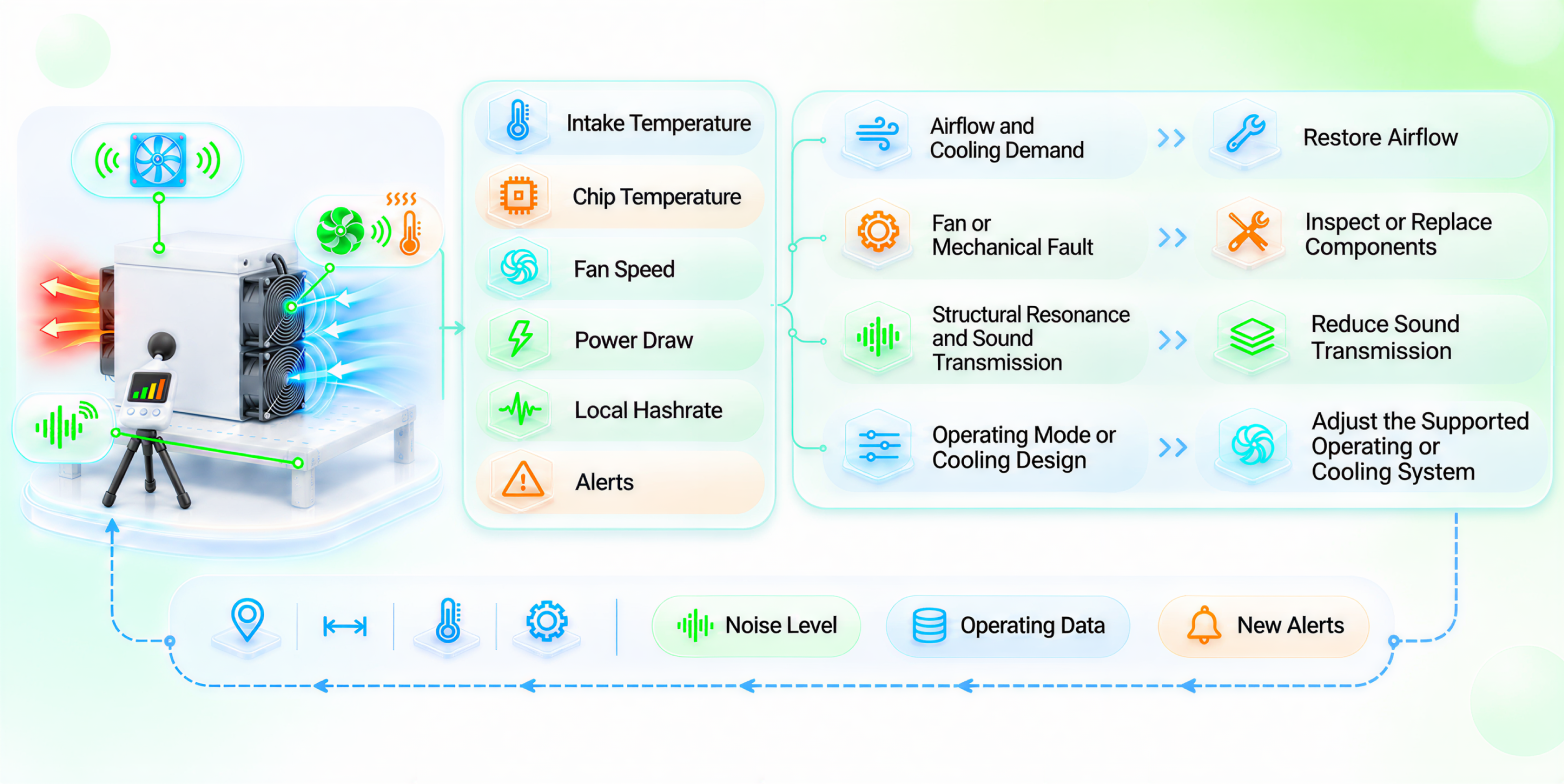
In air-cooling miners, cooling fans running continuously at high speed are usually the main source of noise. When intake temperature rises, airflow is restricted, or hot exhaust recirculates, the fans must speed up to maintain cooling, which also raises the noise level. At a distance of one meter, a single air-cooling miner typically produces around 75–85 dB. In dense deployments, overall site noise can exceed 90 dB.
A complete noise-control process should begin with measuring the sound level and locating the main source. You can then address airflow, miner condition, or the path by which sound travels. Once the work is complete, repeat the measurements under comparable conditions.
Determine Whether the Noise Level Is Too High
The U.S. National Institute for Occupational Safety and Health (NIOSH) recommends limiting daily exposure to eight hours at 85 dBA. Each 3 dBA increase cuts the recommended exposure time in half:
| Continuous Noise Level | Recommended Daily Exposure Time |
| 85 dBA | 8 hours |
| 91 dBA | 2 hours |
| 97 dBA | About 30 minutes |
A simple warning sign is having to raise your voice to speak to someone about an arm’s length away. Until the noise is under control, mark high-noise areas, avoid unnecessary time in them, and wear earplugs or earmuffs when entering.
Locate the Source Before Choosing a Noise-Control Method
Miner fans, rack structures, and facility support equipment produce sound in different ways, so they require different remedies. Identifying the source first keeps you from cleaning equipment that is running normally, adjusting unrelated fan settings, or placing sound barriers where they will not address the source.
Note When and Where the Noise Occurs
Start by recording when the sound changes, then cross-check that timing against afternoon temperature rises, batch start-ups, operating-mode changes, filter maintenance, and the start or stop times of exhaust fans, pumps, and cooling towers.
If only one miner becomes louder, inspect its fans, intake, and mounting first. If an entire rack or row becomes louder at the same time, look for a shared intake restriction, hot-air recirculation, or rack resonance. If the whole site becomes louder, check ambient temperature, site-wide operating-mode changes, and facility cooling equipment.
Use the Character of the Sound to Narrow the Search
A steady rush of high-speed air usually comes from miner fans or facility exhaust equipment. If airflow noise rises with ambient temperature, the cooling load is probably increasing. Scraping, knocking, or rhythmic vibration points more toward a fan bearing, blade, contact with a foreign object, or mounting problem. If a low-frequency hum carries across a wide area around racks or baffles, this may indicate that a metal structure is amplifying local vibration.
If an abnormal sound clearly comes from the fan area, stay clear of rotating parts and do not try to hide the sound by lowering fan speed. Before inspecting it, shut down the miner and disconnect it from its power source, following the requirements for that model.
Use Core Operating Data to Guide Your Troubleshooting
Once you have narrowed down the source, use operating data to determine whether the noise is being caused by cooling demand, an operating mode, or a hardware fault. Review six indicators together: intake-side temperature, chip temperature, fan speed, total power draw, local hashrate, and alerts.
The comparison needs a baseline: normal records from the same miner under similar ambient temperature, load, and operating mode. If no historical record is available, save the current readings before making any changes. Use them only for this before-and-after comparison, not as a normal operating baseline.
| What You Observe | What to Check First | Goal |
| Noise, intake temperature, chip temperature, and fan speed all rise | Higher ambient temperature, restricted intake, or hot-air recirculation | Lower intake temperature and restore a complete airflow path |
| Noise rises and fan speed increases while temperature remains stable | Increased resistance in filters or air passages | Remove blockages and dust that create unnecessary airflow resistance |
| Noise rises while temperature and fan speed remain largely stable | Mechanical fan problem, loose fastener, or structural resonance | Repair the affected component and reduce vibration amplification |
| Noise drops while power and local hashrate also fall | Operating-mode change, frequency reduction, or a protective response | Confirm whether the change was intentional and rule out abnormal throttling |
| Miner data remains stable while site-wide noise rises | Exhaust fans, pumps, heat-exchange equipment, or other support systems | Maintain, isolate, or reposition the main noise source |
Once the table points to a likely cause, move to the corresponding remedy instead of repeatedly adjusting unrelated equipment.
Match the Noise-Control Method to the Cause
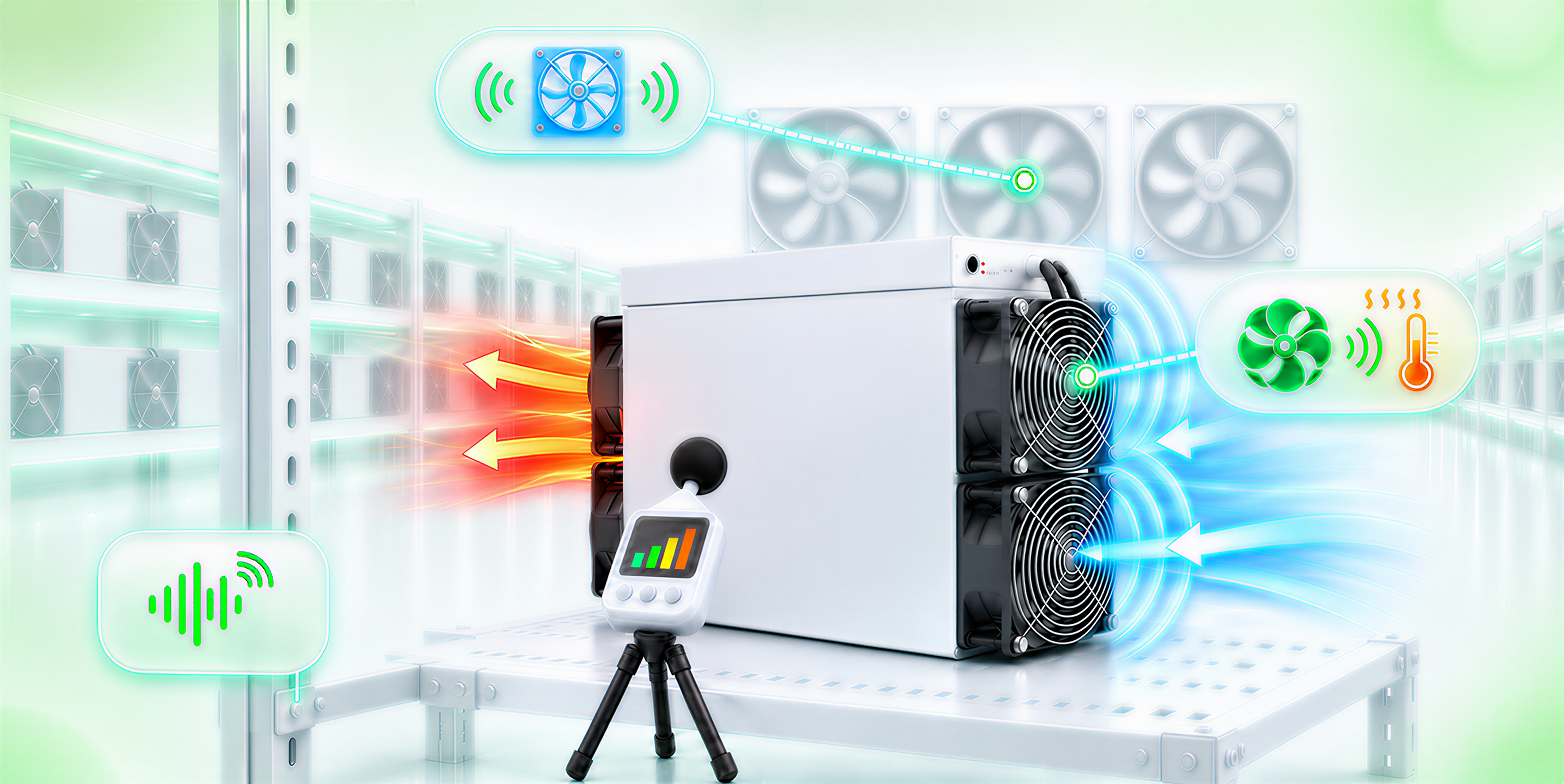
Noise can be addressed in four ways: reducing unnecessary cooling demand on the fans, eliminating mechanical noise and structural resonance, limiting transmission into occupied areas, or changing the operating or cooling system. The right option depends on both the sound source and the operating data.
Restore Airflow to Reduce Unnecessary High-Speed Fan Operation
Air-cooling miners with automatic fan control adjust fan speed in response to temperature. Lowering intake temperature can allow the fans to slow down and reduce noise. Restoring proper airflow is therefore often a practical first step.
Follow the direction of airflow through the site. Check whether cool air reaches the miner intakes without obstruction, whether dust or debris is blocking filters and intake openings, whether the exhaust side has enough clearance, and whether hot air can leave the area freely.
A common problem is hot-air recirculation, where exhaust from a miner returns to its intake. Separate the hot and cold zones with baffles or ducting, and make sure the exhaust direction does not send hot air back toward the miner intakes. Place temperature sensors near the intakes as well. A normal reading in the middle of the room does not mean every row is receiving cool air.
When removing dust, shut down and clean the miner according to the instructions for that model.
Repair Abnormal Fan Noise and Structural Resonance
Scraping, knocking, or irregular vibration calls for a shutdown and inspection. Check whether an object is touching the fan blades, whether the fan is loose, and whether any component is visibly damaged. Before replacing a fan, confirm that its specifications and connector match the miner. Fans that look alike are not necessarily interchangeable.
If a low-frequency hum is concentrated around a rack, baffle, or connection point, check for loose screws, panels, and rack joints. If tightening them lowers the noise while the miner continues to operate normally, structural vibration was likely amplifying the sound. Vibration-isolation pads can also help, provided they do not compromise miner stability, grounding, or airflow.
Reduce Sound Transmission
If the miners are operating normally but the site remains too loud, address the path by which sound travels. Sound-absorbing materials can reduce indoor reflections, while acoustic panels and barriers can limit transmission into occupied areas. Use fire- and heat-resistant materials, and keep them clear of miner intake and exhaust openings as well as electrical equipment.
An acoustic enclosure still needs sufficient intake and exhaust airflow. If its openings are made too small in an attempt to contain sound, the internal temperature can rise, causing the fans to run even faster or triggering overtemperature protection. Where possible, place control rooms and offices away from the miners and use remote monitoring to reduce the need for personnel to enter high-noise areas.
Reduce Noise at the Source Through Operating Modes or Cooling Design
If the model and firmware offer a verified low-power mode or another supported operating mode, switch modes according to the product documentation. Lower power generally reduces heat output and cooling demand, but hashrate may also change. Consider the effect on revenue before making the change.
Hydro cooling systems do not rely on high-speed miner fans to remove heat, so the miner itself can produce less fan noise than an air-cooling model. Pumps and external cooling equipment still generate some noise, while the initial investment and maintenance requirements are also different. Hydro cooling is therefore better evaluated as part of a new facility or a planned retrofit.
Some operators may consider disconnecting fans, installing unofficial firmware that forces lower fan speeds, or wrapping miners in blankets or cardboard boxes. These practices can cause chip temperatures to rise, damage the hardware, and potentially affect warranty coverage.
Do Not Mistake a Quieter Sound for Successful Noise Reduction
Some actions can make a miner sound quieter for a short time while hiding a cooling or hardware problem. Avoid:
- Fixing fan speed at a lower value without confirming the model requirements and temperature-control logic;
- Using an incompatible fan or unverified firmware to bypass alerts;
- Wrapping the miner in a sealed box, foam, or other material that blocks intake or exhaust;
- Continuing to run a fan that is scraping or knocking;
- Cleaning equipment, moving baffles, changing modes, and replacing parts at the same time, which makes the result impossible to attribute;
- Relying on one phone-app reading without accounting for distance, background noise, and miner operating conditions.
If the sound level drops along with power draw or hashrate, the miner may have throttled back or entered a protective state. If the sound level drops while temperature rises, airflow may be insufficient. Return to the operating-mode or airflow checks before continuing.
How to Verify the Noise-Reduction Results
Change one thing at a time and record the sound level and operating data before starting. Once the miner has stabilized after the adjustment, measure again at the same location and distance, under a similar ambient temperature and the same operating mode.
For example, suppose a row of miners becomes louder every afternoon and fan speeds rise at the same time. An inspection finds hot exhaust passing around a baffle and returning to the intake side. Adjust only the baffle; do not clean the miners or change operating modes at the same time. Once conditions stabilize, repeat the measurement at the original location.
Successful noise reduction requires three conditions: the sound level falls at the fixed measurement point; core operating data remains within the previous baseline or changes as expected for the selected operating mode; and no new alerts appear.
Stop Adjustments When Abnormal Conditions Appear
Stop trying to lower fan speed or stack additional changes if:
- Temperature exceeds the operating range specified for the model;
- A fan stops, repeatedly starts and stops, or continues to scrape or knock;
- You notice a burning smell, smoke, or abnormal heat at the miner, cables, or connections;
- The miner repeatedly restarts, remains offline, or shows a sustained decline in local hashrate;
- The problem becomes worse after an adjustment or begins to affect neighboring miners;
- You cannot confirm whether disassembly, component replacement, or power changes meet safety and warranty requirements.
Before opening a technical-support or repair case, gather the miner model and serial number, firmware version, operating mode, time of the incident, alerts, sound-measurement location, and operating data from the same period. Site photos, video that captures the abnormal sound, and a record of steps already taken can help technicians reproduce the problem and avoid repeating checks.
Make Noise Reduction Work for Both Safety and Miner Operation
Effective miner noise control matches the remedy to the source: restore intake and exhaust airflow when cooling is the problem, inspect components when mechanical noise appears, and address sound barriers and personnel placement when transmission is the issue. Forcing fan speeds down or enclosing a miner without adequate airflow often makes the cooling problem worse.
For specific maintenance work, follow the relevant procedures shown in the miner maintenance videos. For fan compatibility, warranty, or repair questions, submit the miner details and service information through Bitdeer Miner After-Sales.
*Information provided in this article is for general information and reference only and does not constitute, and is not intended to be construed as, any advertisement, professional advice, offer, solicitation, or recommendation to deal in any product or to enter into any arrangement with Bitdeer. No guarantee, representation, warranty or undertaking, express or implied, is made as to the fairness, accuracy, timeliness, completeness or correctness of any information, or the future returns, performance or outcome of any product. Bitdeer expressly excludes any and all liability (to the extent permitted by applicable law) in respect of the information provided in this article, and in no event shall Bitdeer be liable to any person for any losses incurred or damages suffered as a result of any reliance on any information in this article.


